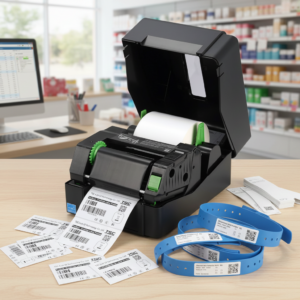
Desktop Barcode Label Printers – For small to medium businesses, startups, and decentralized corporate departments, efficiency is the ultimate goal. When managing inventory, shipping packages, or organizing files, standard office printers quickly reveal their limitations—wasting entire sheets of label paper or producing smudged barcodes that won’t scan.
To bridge the gap between physical inventory and digital tracking without breaking the bank, businesses rely on a desktop barcode label printer.
Compact, affordable, and surprisingly powerful, these machines are essential tools for modern operations. Here is a comprehensive look at what desktop label printers do, where they excel, and how they add value to daily business processes.

What is a Desktop Barcode Label Printer?
A desktop barcode label printer is a compact, space-saving printing device engineered explicitly for low-to-medium volume label production.
Unlike heavy, metal-cased industrial units found in massive distribution centers, desktop models feature a lightweight, usually plastic chassis designed to fit comfortably on an office desk, retail counter, or packing station. They typically handle printing volumes of 500 to 2,000 labels per day, making them the ideal operational footprint for growing businesses.
Recommended Desktop Barcode Label Printers


How They Work: The Two Thermal Technologies
Desktop label printers do not rely on traditional, expensive ink cartridges or laser toners. Instead, they utilize thermal printheads that use heat to create crisp, high-contrast text and barcodes. When selecting a unit, you will choose between two primary technologies:
1. Direct Thermal (DT) Printing
Direct thermal printers apply heat directly from the printhead to specialized, chemically treated label material. The heat causes a chemical reaction that turns the paper black, forming the text or barcode.
- Best For: Short-term labeling applications like standard courier shipping labels, visitor badges, and fresh food expiration tags.
- Advantage: No ribbons, ink, or toner to buy or replace. It is the most straightforward, cost-effective method available.
2. Thermal Transfer (TT) Printing
Thermal transfer printers use a heated printhead to melt a thin layer of wax or resin from a thermal transfer ribbon directly onto the label surface.
- Best For: Long-term tracking, product labels, assets exposed to sunlight, and chemical or outdoor storage.
- Advantage: Exceptional durability. These prints resist smudging, scratching, fading, and moisture damage, allowing you to use synthetic materials like polyester or vinyl.
Key Uses and Applications Across Industries
Because they are highly versatile and easy to operate, desktop label printers serve as crucial assets across a wide variety of business sectors:
E-Commerce and Retail Shipping
For online sellers, a 4-inch desktop printer is a fundamental tool. It integrates directly with platforms like Shopify, WooCommerce, and eBay to generate crisp, instantly scannable courier shipping labels, tracking tags, and return slips on demand.
Retail Product Inventory
Retailers use narrow 2-inch or standard 4-inch desktop units to print point-of-sale (POS) price tags, apparel hangtags, shelf-edge labels, and inventory barcodes. This ensures smooth checkout processes and accurate stock-level tracking.
Office Administration and Asset Management
From indexing file folders and labeling archives to tracking internal hardware (like laptops, monitors, and office furniture), desktop units help administrative teams maintain organizational control with clear, professional tags.
Healthcare and Independent Pharmacies
In clinics and pharmacies, desktop label printers generate small, high-resolution patient wristbands, specimen collection tubes, and prescription bottle labels where clarity and legibility are safety-critical.
Desktop vs. Industrial: Why Choose a Desktop Barcode Label Printers?
If you are trying to decide which class of barcode printer fits your workspace, consider the core advantages a desktop unit offers over industrial machinery:
- Cost-Effective Entry: Desktop models require a significantly lower upfront capital investment while still offering professional-grade print quality.
- Space Optimization: They require minimal surface area and can be moved easily around a storefront or packing room as layout needs change.
- Minimal Maintenance: With fewer complex mechanical parts than an industrial machine, media loading is intuitive, and routine printhead cleaning takes less than a minute.
- On-Demand Flexibility: You can print a single label for a walk-in customer or run a batch of 200 tracking stickers for an incoming shipment without wasting raw materials.
Desktop Barcode Label Printers Critical Specifications to Evaluate
When shopping for a desktop barcode printer, pay close attention to these three core metrics to ensure a perfect match for your workflow:
| Metric | Standard Configuration | When to Upgrade |
| Print Resolution | 203 dpi (dots per inch) – Perfect for clear, standard shipping labels and retail barcodes. | Upgrade to 300 dpi if you need to print tiny, microscopic fonts or dense barcodes on small labels (like jewelry tags or small electronics component stickers). |
| Connectivity | USB – Standard for linking the printer directly to a single computer station. | Look for models featuring Wi-Fi, Ethernet, or Bluetooth if multiple team members need to send print jobs from tablets, mobile devices, or separate workstations. |
| Maximum Print Width | 4-Inch Media Bed – The industry benchmark, giving you the flexibility to print everything from small price tags up to large 4×6 shipping labels. | Opt for a smaller 2-inch printer only if you have extreme desk space constraints and exclusively print narrow wristbands or small pricing stickers. |
By aligning a desktop label printer’s thermal technology and resolution with your specific daily throughput, you remove operational friction, eliminate ink costs, and ensure your inventory remains accurately tracked from the moment it arrives until it out the door.