How to Clean Thermal Print Heads with Inkanto Wipes
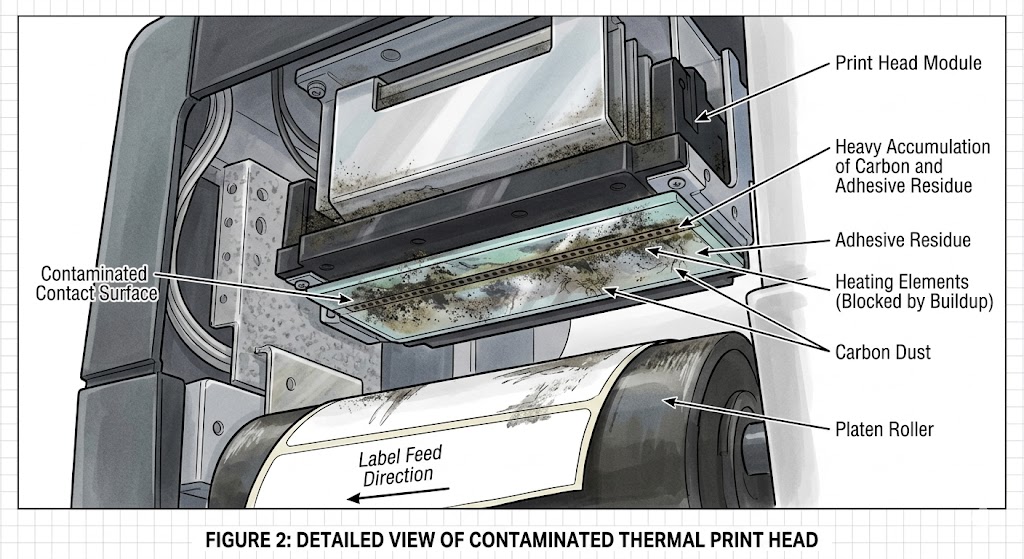
In the world of thermal transfer and direct thermal printing, the print head is the most critical (and often the most expensive) component. Over time, dust, adhesive residue, and carbon buildup from ribbons can accumulate, leading to poor print quality, “white lines,” and eventually, premature hardware failure.
Using specialized tools like Inkanto Print Head Cleaning Wipes is the most effective way to maintain crisp barcodes and extend the life of your equipment. Here is a professional guide on how to perform this essential maintenance.
Why Regular Cleaning Matters
Every time a label or ribbon passes under the print head, it creates friction and microscopic debris. If left uncleaned:
- Abrasive Wear: Built-up residue acts like sandpaper, physically wearing down the heating elements.
- Poor Heat Distribution: Dirt creates a barrier, forcing the print head to use higher “darkness” settings to achieve a clear image, which shortens its lifespan.
- Increased Downtime: Frequent scanning errors due to faded barcodes can halt production lines.
Step-by-Step Guide: Cleaning with Inkanto Wipes
Inkanto wipes are pre-saturated with a specific concentration of isopropyl alcohol, designed to dissolve stubborn residues without leaving streaks or damaging the delicate glass coating of the print head.
1. Preparation and Safety
Before starting, turn off the printer and unplug it from the power source. If you have just finished a large print job, allow the print head to cool for several minutes to avoid thermal shock or burns.
2. Access the Print Head
Open the printer cover and engage the print head release lever. If you are using a thermal transfer printer, remove the ribbon and the label roll to give yourself a clear workspace.
3. The Cleaning Motion
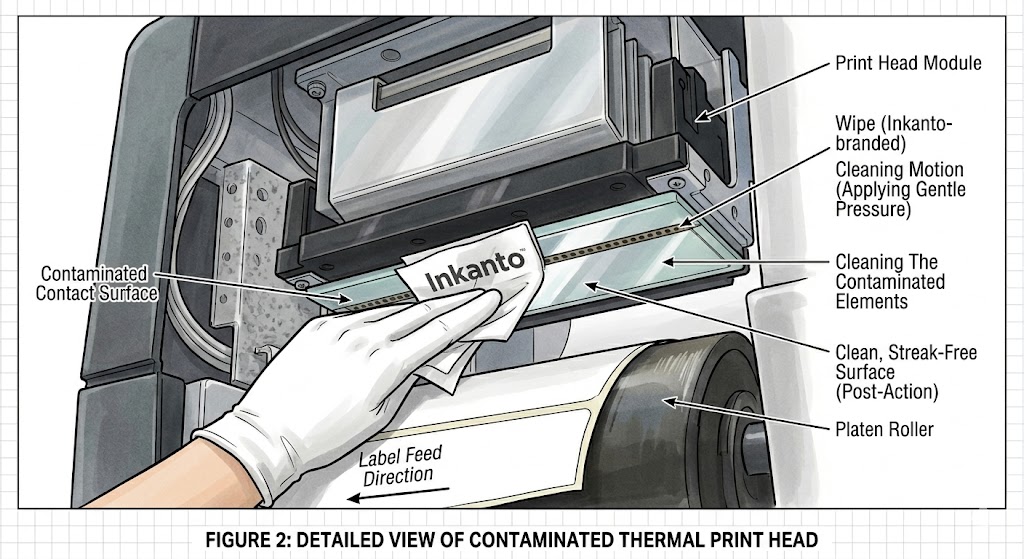
Open a fresh Inkanto cleaning wipe. Gently but firmly wipe the entire length of the print head (the thin, dark strip located on the underside of the assembly).
- Pro Tip: Always wipe in one direction or use a “light scrubbing” motion on areas with visible carbon buildup.
- Don’t Forget the Platen Roller: Use the same wipe to clean the rubber platen roller. Rotate the roller manually to ensure you remove all dust and adhesive from the entire circumference.
4. Inspection and Drying
Look at the wipe; if it is dark or grey, it has successfully lifted the oxidation. Inspect the print head for any remaining spots. Wait approximately 30 to 60 seconds for the alcohol to evaporate completely before reloading your media.
5. Reload and Test
Reinstall your ribbon and labels, lock the print head back into position, and run a test print. You should notice sharper edges and more consistent solid blacks.
Maintenance Schedule: When to Clean?
To maximize your ROI, follow these industry-standard intervals:
- Thermal Transfer Printing: Clean the print head every time you replace the ribbon.
- Direct Thermal Printing: Clean the print head every time you replace a roll of labels.
Final Thoughts
Preventative maintenance is significantly cheaper than part replacement. By integrating Inkanto Print Head Wipes into your standard operating procedure, you ensure that your barcodes remain scannable and your industrial printers stay in peak condition for years to come.