What Are Direct Thermal Barcode Printers
Direct thermal printers are a type of printer that produces images by applying heat to a specially coated, heat-sensitive material. This process causes the material to darken, creating the desired image.
How they work:
Heat-sensitive media: Direct thermal printers use a special type of paper or label material that is coated with a chemical that turns black when exposed to heat.
Direct heat application: The printhead in the printer applies heat directly to the coated material, creating the image without the need for ink, toner, or ribbons.
Advantages of direct thermal printers:
Simplicity: Direct thermal printers are simple to operate and maintain, as they don’t require ink, toner, or ribbons.
Cost-effective: The initial cost of direct thermal printers is typically lower than other types of printers.
Compact and portable: Direct thermal printers are often compact and portable, making them ideal for mobile applications.
Limitations of direct thermal printers:
Limited media options: They can only use heat-sensitive materials, which may limit your options for label types and colors.
Sensitivity to heat and light: The printed images can fade or darken if exposed to excessive heat, sunlight, or other harsh environmental conditions.
Shorter lifespan: Direct thermal prints are generally not as durable as thermal transfer prints and may fade over time.
Common applications for direct thermal printers:
Receipt printing: Direct thermal printers are widely used for printing receipts in retail, restaurants, and other businesses.
Shipping labels: They are often used for printing shipping labels for packages and envelopes.
Tickets and tags: Direct thermal printers can be used to print tickets for events, parking passes, and other types of tags.
Short-term labeling: They are suitable for applications where labels don’t need to last for an extended period, such as labels for perishable goods or temporary identification.
Key considerations when choosing a direct thermal printer:
Print quality: Consider the resolution and print speed of the printer to ensure it meets your needs.
Label size and type: Make sure the printer can accommodate the size and type of labels you need.
Connectivity: Choose a printer with connectivity options that suit your setup (USB, Bluetooth, wireless).
Durability: If your labels will be exposed to any harsh conditions, direct thermal may not be the best choice.
Direct thermal printers are a good option for businesses that need a simple, cost-effective, and portable printing solution for short-term labeling applications. However, if you need durable, long-lasting labels, thermal transfer printers are a better choice.
What Are Thermal Transfer Barcode Printers
Thermal transfer barcode printers are a type of printer that uses heat to transfer ink from a ribbon onto a label or tag. This creates a durable, long-lasting print that is resistant to smudging and fading. Thermal transfer printers are ideal for a variety of applications, including:
1. Product Labeling:
Manufacturing: Durable labels for product identification, batch numbers, serial numbers, and compliance information.
Retail: Price tags, product information, and promotional labels. Food and Beverage: Labels for ingredients, nutritional information, and branding.
2. Asset Tracking:
Logistics: Labels for tracking inventory, pallets, and containers throughout the supply chain.
Healthcare: Labels for medical equipment, patient files, and specimens.
Manufacturing: Labels for tools, equipment, and work-in-progress items.
3. Shipping and Receiving:
Courier Services: Labels for packages, envelopes, and shipping documents.
Warehousing: Labels for identifying storage locations and organizing inventory.
4. Healthcare:
Patient Identification: Wristbands and labels for patient tracking and medication administration.
Specimen Labeling: Labels for blood samples, lab tests, and other medical specimens.
Pharmacy: Labels for prescriptions and medication bottles.
5. Manufacturing:
Parts and Components: Labels for identifying parts, components, and sub-assemblies.
Work-in-Progress: Labels for tracking items through the production process.
Quality Control: Labels for marking products that have passed inspection.
6. Other Industries:
Transportation: Labels for baggage tags, tickets, and boarding passes.
Government: Labels for asset tracking, document management, and identification cards.
Automotive: Labels for parts identification, vehicle tracking, and warranty information.
How they work:
Heat Transfer: Thermal transfer printers use a heated printhead to melt ink from a ribbon onto a label material. This process creates a high-quality image that’s resistant to smudging, fading, and abrasion.
Ribbon Required: Unlike direct thermal printers, thermal transfer printers require a ribbon, which is an additional supply you’ll need to purchase.
Advantages of thermal transfer printers:
Long-lasting prints: Thermal transfer printers use a ribbon to transfer ink onto the label, creating a print that is highly resistant to smudging, fading, scratching, and even some chemicals. This makes them ideal for labels that need to withstand harsh environments or last for an extended period.
Variety of materials: You can use a wider range of label materials with thermal transfer printers, including paper, synthetic materials (like plastic), and even fabric. This versatility allows you to choose the best material for your specific needs and environment..
Sharp, clear images: Thermal transfer printers produce crisp, high-resolution barcodes and text, ensuring readability and scannability. This is crucial for accurate tracking and identification
Long-lasting printhead: Printheads in thermal transfer printers tend to have a longer lifespan compared to direct thermal printers.
Consistent print quality: The printing process ensures consistent image density and color, resulting in reliable and professional-looking labels.
Things to consider when choosing a thermal transfer printer:
Print resolution: Measured in dots per inch (DPI), higher DPI means sharper images. Consider your needs for text and barcode clarity.
Print speed: Measured in inches per second (IPS), this determines how quickly labels are printed.
Label size and type: Make sure the printer can accommodate the size and type of labels you need.
Connectivity: Choose a printer with connectivity options that suit your setup (USB, Ethernet, wireless).
Duty cycle: Consider the volume of labels you’ll be printing to ensure the printer can handle the workload.
Cost: Thermal transfer printers generally have a higher upfront cost than direct thermal printers, but the long-term cost can be lower due to the durability of the prints and longer printhead life.
What Makes the Labels Last?
Ink Type: Thermal transfer printers use ribbons with different ink types (wax, resin, or a combination) that are designed for durability.
Specialized Inks: Thermal transfer ribbons use inks specifically designed for durability. These inks can be wax-based, resin-based, or a combination of both. Resin-based inks, in particular, are known for their resistance to chemicals, extreme temperatures, and abrasion.
Heat and Ribbon: Thermal transfer printing uses a heated printhead to melt ink from a ribbon onto the label material. This process creates a strong bond between the ink and the label, making it more resistant to smudging, fading, and scratches compared to other printing methods.
Here’s a simple analogy: Imagine you’re writing on a piece of paper. If you use a regular pen, the ink might smudge or fade over time. But if you use a permanent marker on a durable plastic sheet, the writing will last much longer. Thermal transfer printing is like using that permanent marker on a durable material.
What Are Thermal Transfer Ribbons
Thermal transfer ribbons are an essential component in thermal transfer printing. They are the key to creating durable and long-lasting labels. Here’s a breakdown of what you need to know about them:
What are thermal transfer ribbons?
Thermal transfer ribbons are rolls of material coated with ink. When used in a thermal transfer printer, the printhead heats up and melts the ink from the ribbon onto the label material, creating a high-quality image.
Types of thermal transfer ribbons:
Thermal transfer ribbons are available in three main types, each with its own characteristics and ideal applications:
- Wax ribbons: These are the most economical option and are suitable for general-purpose labeling on paper materials. They offer good print quality and are ideal for applications where labels are not exposed to harsh environments.
- Wax/resin ribbons: These ribbons offer a balance of durability and affordability. They are suitable for use on both paper and synthetic labels and provide better resistance to smudging, scratching, and some chemicals compared to wax ribbons.
- Resin ribbons: These are the most durable option and are designed for use on synthetic labels. They offer excellent resistance to harsh chemicals, extreme temperatures, and abrasion, making them ideal for industrial and outdoor applications.
Choosing the right ribbon:
Selecting the right thermal transfer ribbon is crucial for ensuring the quality and durability of your labels. Here are some factors to consider:
- Label material: The type of label material you are using will determine the type of ribbon that is compatible.
- Application environment: Consider the environment where the label will be used. If it will be exposed to harsh chemicals, extreme temperatures, or abrasion, you will need a more durable ribbon.
- Print quality: If you need high-quality images with sharp barcodes and text, you may need to choose a ribbon with a higher density ink.
Ribbon sizes and compatibility:
Thermal transfer ribbons come in various widths and lengths to fit different printers. It’s essential to ensure that the ribbon you choose is compatible with your specific printer model. You can usually find this information in your printer’s user manual or on the manufacturer’s website.
Where to buy thermal transfer ribbons:
Thermal transfer ribbons are available from various suppliers, including:
- Barcode and labeling specialists: Companies specializing in barcode and labeling solutions can provide expert advice and help you choose the right ribbon for your needs.
- Printer manufacturers: Some printer manufacturers also sell their own branded ribbons.
Tips for storing thermal transfer ribbons:
To ensure the longevity and performance of your thermal transfer ribbons, it’s essential to store them properly. Here are some tips:
- Store ribbons in a cool, dry place away from direct sunlight and heat sources.
- Keep ribbons in their original packaging until ready to use.
- Avoid storing ribbons in areas with high humidity or fluctuating temperatures.
By understanding the different types of thermal transfer ribbons and how to choose the right one for your needs, you can ensure that your labels are durable, legible, and long-lasting.
What Are Desktop Barcode Printers
Desktop label printers are compact and versatile printing devices designed for use on a desk or countertop. They are ideal for a variety of labeling tasks in offices, small businesses, and home environments. Here’s a breakdown of what you should know about them:
Types of Desktop Label Printers:
- Thermal Label Printers: These are the most common type and use heat to create images on special label material. There are two main types:
- Direct thermal printers: These use heat-sensitive labels that darken when heated. They are simple and cost-effective but produce labels that may fade over time.
- Thermal transfer printers: These use a ribbon to transfer ink onto the label, creating more durable and long-lasting prints.
Features of Desktop Label Printers:
- Compact size: Designed to fit comfortably on a desk or countertop.
- Easy to use: Simple to set up and operate, with user-friendly software.
- Versatile: Can print a variety of label types and sizes.
- Affordable: Generally more affordable than industrial-grade label printers.
- Connectivity: Offer various connectivity options, such as USB, Bluetooth, and Wi-Fi.
Factors to Consider When Choosing a Desktop Label Printer:
- Printing technology: Decide whether you need direct thermal, thermal transfer based on your needs for durability, print quality, and cost.
- Label size and type: Make sure the printer can accommodate the size and type of labels you need.
- Print volume: Consider how many labels you will be printing to ensure the printer can handle the workload.
- Connectivity: Choose a printer with connectivity options that suit your setup.
- Software compatibility: Ensure the printer is compatible with your operating system and any labeling software you plan to use.
Common Applications for Desktop Label Printers:
- Shipping labels: For packages and envelopes.
- Product labels: For identifying products, including barcodes, pricing, and branding.
- File folder labels: For organizing documents and files.
- Address labels: For mailing and correspondence.
- Barcode labels: For inventory management and tracking.
Benefits of Using Desktop Label Printers:
- Convenience: Print labels on demand, as needed.
- Cost-effective: Eliminate the need to order pre-printed labels.
- Flexibility: Customize labels with variable data, such as barcodes, serial numbers, and dates.
- Improved efficiency: Streamline labeling processes and reduce errors.
The number of labels a desktop printer can print depends on a few factors, and there’s no single magic number. Here’s a breakdown:
- Printer Model and Duty Cycle: Each printer has a recommended “duty cycle,” which is the number of labels it’s designed to print within a specific timeframe (usually per month). This information is available in the printer’s specifications or user manual. A higher duty cycle means the printer is more robust and can handle more volume. Don’t exceed the recommended duty cycle, as it can lead to premature wear and tear.
- Label Size and Layout: Smaller labels generally mean you can print more per roll (and potentially per print job) than larger labels. Also, how the labels are arranged on the roll or sheet matters. Printing multiple labels across the roll (sometimes called “2-up” or “3-up” printing) can impact how the printer handles the job. The printer treats the label media as one continuous piece, regardless of how many labels are laid out across.
- Label Roll Length: Label rolls come in different lengths, so a longer roll will obviously allow for more labels to be printed before you need to change the roll.
- Printer’s Memory and Processing Power: Some complex labels with lots of graphics or variable data might require more of the printer’s resources. Printers with more memory and faster processors can handle larger print jobs without issues.
- Printing Software: The software you use to design and manage your labels can also impact how many labels you can print in one go. Some software may have limitations on batch printing or variable data printing.
So, how many labels can you actually print?
For large volumes: If you consistently need to print thousands of labels at a time, you might want to consider a more robust industrial-grade label printer, which are designed for high-volume printing.
For everyday use: Most desktop label printers can comfortably handle hundreds of labels in a single print job, as long as you’re within the printer’s duty cycle and the label rolls are appropriately sized.
What Are Industrial Barcode Printers
When a business outgrows standard office equipment, tracking inventory moves from a matter of organization to a critical core function. In high-velocity environments like massive distribution hubs, 24/7 manufacturing plants, and heavy logistics centers, smaller desktop units quickly reach their limits.
To keep supply chains moving without interruption, operations rely on an industrial barcode label printer.
These heavy-duty machines are built to withstand harsh environments while maintaining high throughput. Here is an overview of what makes an industrial printer different, where they are used, and how to know if your business requires one.
What is an Industrial Barcode Label Printer?
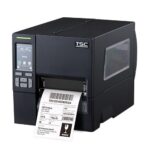
An industrial barcode label printer is a rugged, high-capacity machine engineered for high-volume, continuous printing operations.
Unlike desktop alternatives wrapped in plastic casings, industrial units feature all-metal internal mechanisms and reinforced steel housings. They are explicitly designed to run 24 hours a day, 7 days a week, processing thousands of labels per shift without overheating or failing.


Key Features Built for Demanding Environments
Industrial printers represent a major step up in both physical build and internal processing power. Their most defining features include:
- Massive Media Capacity: They house exceptionally large rolls of labels and high-capacity thermal ribbons (often up to 450 meters or more in length). This drastically reduces downtime caused by operators constantly stopping production lines to reload supplies.
- Blazing Print Speeds: While a standard desktop printer tops out around 4 to 6 inches per second (ips), high-end industrial models easily exceed 12 to 14 ips. This allows them to output hundreds of crisp compliance labels in minutes.
- Rugged Environmental Resistance: The metal enclosures shield sensitive electronic components from ambient dust, airborne particles, moisture, and accidental impacts common on factory floors.
- Advanced Connectivity and Integration: They frequently feature robust on-board processing, extensive network security protocols, multiple active connection types (Ethernet, USB, Serial, and dual-band Wi-Fi), and direct integration into complex Warehouse Management Systems (WMS) or Enterprise Resource Planning (ERP) platforms.
Primary Uses and Industrial Applications
Industrial barcode printers serve as the logistical backbone across several major global sectors:
1. Manufacturing and Product Identification
In manufacturing, components must be tracked from raw materials to finished goods. Industrial printers generate durable asset tags, component labels, and rating plates that remain legible even when exposed to heat, chemicals, or abrasion during assembly.
2. Warehousing, Logistics, and Distribution
Distribution hubs rely on high-speed printing to keep pace with incoming and outgoing freight. These printers produce large-format pallet labels, GS1-128 compliance labels, and shipping tags that ensure logistics networks can scan and route inventory accurately.
3. Food and Beverage Processing
With strict traceability regulations, food production plants use industrial thermal transfer technology to print clear batch numbers, expiration dates, and allergen warnings onto packaging materials that survive freezing or high-humidity cold storage.
4. Healthcare and Pharmaceuticals
From tracking bulk medication shipments to labeling thousands of laboratory specimen tubes daily, industrial units provide the extreme precision (often utilizing ultra-high resolution 600 dpi printheads) required to generate tiny, perfectly scannable barcodes on miniature vials.
Industrial vs. Desktop Label Printers: The Core Differences
Evaluating whether to transition to an industrial asset depends heavily on your daily volume and operational footprint:
| Feature | Desktop Label Printer | Industrial Label Printer |
| Chassis Build | Plastic housing | Die-cast aluminum / steel frame |
| Daily Output | 500 – 2,000 labels per day | 5,000 to continuous 24/7 printing |
| Max Print Speed | 4 – 6 inches per second | 10 – 14+ inches per second |
| Ribbon Capacity | 74 – 300 meters | 450 – 900 meters |
| Common Uses | Small retail, office shipping, file tracking | Logistics, manufacturing, bulk distribution |
Choosing the Right Industrial Unit for Your Operation
When selecting an industrial printer, it is important to match the technical specifications to your environmental realities. For standard warehousing applications, a 203 dpi model offers the fastest throughput for large shipping labels. However, if your facility prints tiny electronics labels or needs to match microscopic font requirements on pharmaceutical packaging, stepping up to a 300 dpi or 600 dpi model ensures small barcodes remain scannable.
By choosing a machine designed to match your specific volume, ribbon composition, and durability requirements, you secure a reliable asset that prevents supply chain bottlenecks and protects operational efficiency over the long haul.