
Boasting the highest print speeds in it’s class with a variety of connectivity options, the Brother QL-810W professional label printer is the ideal solution for business. Offering unrivalled versatility not only in the office, but also across retail, food, postal, facilities management and other industries,


Print Method: Direct Thermal
Max Print Width: 58.93mm
Print Speed: 176mm/s
Interface Ports: USB + Wi-Fi
Warranty: 3 Years
Product Brand: Brother
MPN: QL-810W
Included Software: P-touch Editor Lite and more
Labels: Uses DK Rolls
Brother QL-810W Price
R 4 748,49 incl vat
Delivery R180 to major centres in SA
Available to order
Flat Rate Delivery R180
or Pickup Free from our premises.
Ready for Collection/Shipping 2 to 4 working days after we receive POP.
Key Features
- USB and Wi-Fi connectivity
- Prints on die cut labels and rolls up to 62mm wide up to 3m
- Prints in both Black and Red
- Built-in label design software for PC/Mac
- P-Touch Editor for advanced label design
- Fast print speed of 110 labels/min
- 58.93mm Max print Width
- 300 dpi Print resolution
- Automatic cutter
- Various image types and barcodes supported
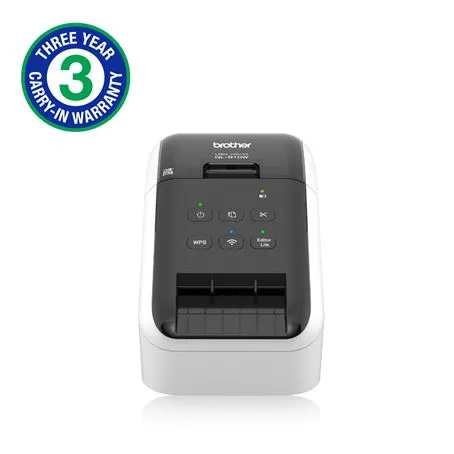
While the Brother QL-800 is a powerhouse for stationary desks, the Brother QL-810W is the answer for businesses that need to break free from the USB cable. In 2026, as mobile-first workflows and flexible workspaces become the standard, the QL-810W remains a top-tier choice for professional, wireless thermal labeling.
Here is everything you need to know about this ultra-fast, wireless labeling solution.
Key Features: More Than Just Wireless
The QL-810W takes the core DNA of the QL-800 and upgrades it for a modern, multi-device environment.
- Wireless Connectivity: Built-in Wi-Fi allows you to print from across the room—no more cluttering your desk with cables.
- AirPrint & Mobile Support: Fully compatible with Apple AirPrint and the Brother iPrint&Label app (iOS/Android), making mobile printing seamless.
- Insane Speed: Clocking in at up to 110 standard address labels per minute, it is roughly 20% faster than the entry-level QL-800.
- Black/Red Printing: Like its siblings, it can print in two colors (using DK-22251 rolls) to highlight warnings, expiration dates, or “Rush” shipments.
- Optional Portability: Compatible with a rechargeable Li-ion battery (sold separately), turning it into a truly mobile workstation for warehouses or events.
Brother QL-810W vs. QL-800: Which One Fits Your Business?
Choosing between these two depends entirely on your workflow.
| Feature | Brother QL-800 | Brother QL-810W |
| Connection | USB Only | USB + Wi-Fi (AirPrint) |
| Max Speed | 93 Labels/Min | 110 Labels/Min |
| Mobile Printing | Limited (USB-to-GO) | Seamless (Wireless) |
| Battery Option | No | Yes (Optional) |
| Best For | Single-user desktops | Shared offices & mobile teams |
Why Upgrade to the QL-810W in 2026?
1. Brother QL-810W Shared Network Access
In a modern office, one printer often serves an entire team. With the QL-810W, multiple employees can send print jobs from their own laptops or mobile devices via the office Wi-Fi, eliminating the “bottleneck” of a single dedicated PC.
2. Mobile Logistics and Warehousing
If you are moving through a warehouse or managing a check-in desk at a conference, the QL-810W is your best friend. By adding the optional Li-ion battery pack, you can print labels on the go without searching for a power outlet.
3. The “Red Alert” Marketing Advantage
Just like the QL-800, the 810W uses special thermal technology to print in Black and Red. In a world where customers are bombarded with packages, a shipping label with a red “Special Gift Inside” or “Fragile” note stands out instantly.
Brother QL-810W Software and Integration
The QL-810W is a “Plug & Label” device.
- P-touch Editor Lite: Built directly into the printer. Just plug it in, and the software launches automatically on Windows.
- Advanced P-touch Editor: For power users who need to link Excel databases or create complex barcode systems.
- SDK Availability: For 2026 developers, Brother offers SDKs for Windows, iOS, and Android to integrate label printing directly into your own custom business apps.
The Verdict: The Wireless Workhorse
The Pro: It offers the perfect balance of speed and mobility. The AirPrint support alone makes it worth the extra investment for Mac and iPhone users.
The Con: Initial Wi-Fi setup can occasionally be finicky on some networks, and the optional battery adds to the total cost.
The Brother QL-810W is designed for the fast-paced business that needs more than just a printer—it needs a versatile labeling hub. If you find yourself frequently switching between devices or needing to print labels from your phone while on the move, this is the upgrade you’ve been looking for.
Are you planning to use the printer primarily for shipping labels, or are you looking into the black-and-red feature for retail and safety signage?
