
The Brother QL-800 label printer provides unprecedented flexibility and creative possibilities for users, it also prints both black and red text, enabling a variety of use applications including warnings, special identification of persons on name tags, highlighting important messages, emphasising offers on signs or for practical reminders.


Print Method: Direct Thermal
Max Print Width: 58.93mm
Print Speed: 148mm/s
Interface Ports: USB
Warranty: 3 Years
Product Brand: Brother
MPN: QL-800
Included Software: P-touch Editor Lite
Labels: Uses DK Rolls
Brother QL-800 Price
R 3 183,06 incl vat
Delivery R180 to major centres in SA
Available to order
Flat Rate Delivery R180
or Pickup Free from our premises.
Ready for Collection/Shipping 2 to 4 working days after we receive POP.
QL-800 Key Features
- USB
- Prints on die cut labels and rolls 12-62mm wide up to 1m
- Prints in both Black and Red
- Built-in label design software for PC/Mac
- P-Touch Editor for advanced label design (PC/Mac)
- Fast print speed of Maximum 148mm/sec (93 labels/minute)
- 58.93mm Max print width
- 300 dpi Print resolution
- Automatic cutter
- Various image types and barcodes supported
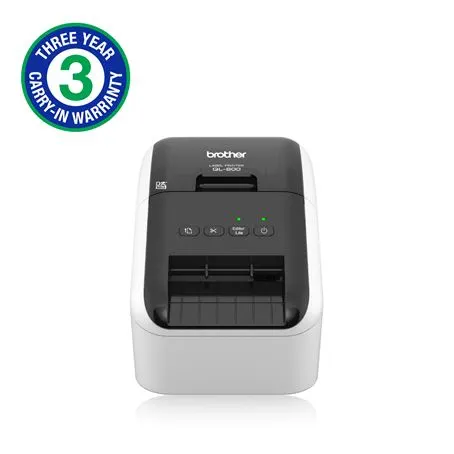
The Brother QL-800 has long been a staple in professional environments, and in 2026, it remains one of the most reliable entry-level high-speed label printers on the market. Whether you are running a home-based e-commerce shop or managing a busy corporate mailroom, this device offers a blend of speed and unique features that few competitors can match at its price point.
Key Features at a Glance
- Two-Color Printing: The standout feature. When using the DK-22251 continuous roll, you can print in both Black and Red without needing ink or toner.
- Rapid Output: Speeds up to 93 standard address labels per minute, ensuring you aren’t stuck waiting during high-volume shipping runs.
- Plug & Label: Built-in software allows you to connect via USB and start designing immediately on Windows—no driver installation required for basic tasks.
- High Resolution: Supports up to 300 x 600 dpi, making it perfect for crisp logos, barcodes, and fine text.
- Integrated Auto-Cutter: A durable automatic cutter allows you to create custom-length banners up to 3 feet long.
Why the Brother QL-800 Stands Out in 2026
1. The Power of Red
Most thermal printers are strictly monochrome. The QL-800’s ability to highlight text in red is a game-changer for business safety and marketing. It is ideal for:
- Hazardous Materials: Highlighting “Fragile” or “Flammable” warnings.
- Retail: Marking “Clearance” or “Sale” prices that grab attention.
- Food Safety: Clearly marking expiration dates or allergen warnings.
2. Thermal Technology = Zero Ink Costs
The QL-800 uses Direct Thermal Printing. This means the heat from the print head reacts with the special coating on Brother DK rolls to create the image. You will never have to buy an ink cartridge or ribbon again, significantly lowering your long-term operating costs.
3. Brother QL-800 Versatile Labeling Options
The printer supports a wide array of Brother DK drop-in rolls:
- Pre-sized Labels: For standard shipping (4″ x 2″), address labels, and file folders.
- Continuous Tapes: For custom-length signage or long banners.
- Film Labels: More durable, moisture-resistant options for long-term labeling.
Technical Specifications
| Feature | Specification |
| Print Technology | Direct Thermal |
| Max Print Speed | 148 mm/sec (approx. 93 labels/min) |
| Resolution | 300 x 300 dpi (Standard) / 300 x 600 dpi (High Res) |
| Connectivity | USB 2.0 (Type B) |
| Max Label Width | 62 mm (2.4 inches) |
| Compatible OS | Windows, macOS, Android (via USB-to-GO) |
Software and Integration
The QL-800 is highly compatible with the tools you already use.
- P-touch Editor: Brother’s advanced design software allows for database integration (Excel, CSV) to batch-print hundreds of unique labels in seconds.
- Microsoft Office Add-ins: Print directly from Word, Excel, or Outlook with a single click.
- Mobile Printing: While the QL-800 lacks Wi-Fi, Android users can still print via the iPrint&Label app using a USB-to-GO cable.
The Verdict: Is The Brother QL-800 Right for You?
The Pro: It is incredibly fast, easy to set up, and the black/red printing is a unique advantage that rivals like Dymo don’t offer in this class.
The Con: It requires a physical USB connection. If you need wireless printing from multiple devices or iPhones, you might consider its “older brother,” the QL-810W.
The Brother QL-800 remains the “sweet spot” for professionals who need high-quality, high-speed labels without the complexity (or cost) of enterprise-grade machinery.
What kind of labeling tasks are you looking to tackle—high-volume shipping, or more specialized organizational work?
