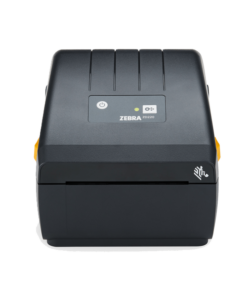
Finding a reliable, cost-effective shipping and barcode printing solution is a priority for small businesses, e-commerce operations, and warehouses. The Zebra ZD220 Direct Thermal Desktop Printer offers enterprise-grade reliability at an entry-level price point, delivering simple setup and dependable performance out of the box.
Zebra ZD220 4″ Direct Thermal Label Printer with USB

Print Method: Direct Thermal
Max Print Width: 104mm
Print Speed: 4ips
Interface Ports: USB
Warranty: 2 Years
Product Brand: Zebra
MPN: ZD22042-D0EG00EZ
Included Software: ZebraDesigner Essentials – easy label design tool
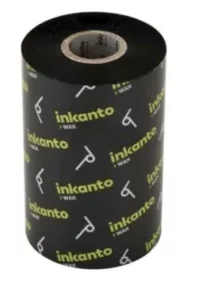
Ribbon Length: 74/300 meters
R4,104.35 incl vat
R3,853.65 incl vat
Available to order
Nationwide Delivery: For all provinces R170 excl vat.
Local Pickup: Free collection available from our premises.
Processing Time: Orders are ready for collection or dispatch within 2 to 4 working days after payment reflects in our account.
Key Features & Capabilities
The Zebra ZD220 is engineered to streamline daily operations without unnecessary complexity.
- Direct Thermal Printing: Uses heat-sensitive media to produce sharp barcodes and text without ink, toner, or thermal ribbons, lowering consumable costs.
- 4-Inch Print Width: Standard print width accommodates $4 \times 6$ inch shipping labels, inventory tags, compliance labels, and address stickers.
- Fast Print Speeds: Print speeds reach up to 4 inches per second ($102\text{ mm/s}$) at 203 DPI resolution for clear, scannable text and barcodes.
- Clamshell Open Design: The OpenACCESS™ clamshell enclosure simplifies label roll replacement, minimizing downtime during media changes.
- Plug-and-Play Connectivity: Equipped with USB 2.0 connectivity for straightforward integration with standard hardware setups.
Technical Specifications
| Specification | Details |
| Print Method | Direct Thermal (No Ribbon Required) |
| Resolution | 203 DPI ($8\text{ dots/mm}$) |
| Max Print Speed | 4 in./sec ($102\text{ mm/s}$) |
| Max Print Width | 4.09 in. ($104\text{ mm}$) |
| Media Core Diameter | 0.5 in. ($12.7\text{ mm}$) to 1.0 in. ($25.4\text{ mm}$) |
| Connectivity | USB 2.0 |
| Programming Languages | ZPL II, EPL II |
Ideal Applications
The Zebra ZD220 is suited for low-to-medium volume printing environments:
- E-Commerce & Shipping: Rapidly generate courier shipping labels (USPS, FedEx, UPS, DHL) and packing slips.
- Retail & Point of Sale: Print price tags, barcode stickers, and product markdowns.
- Warehousing & Distribution: Label inventory shelves, bin locations, and incoming shipments.
- Healthcare & Administration: Create visitor badges, specimen tags, and record identification labels.
Why Choose the Zebra ZD220?
The ZD220 replaces older models like the GC420d, delivering reinforced double-wall construction and updated internals. Backed by Zebra’s Print DNA Basic software suite, it supports standard driver setup and management tools to keep daily operations moving reliably.
Zebra ZD220 Technical Specifications
| Category | Specification | Details |
| Printer Specifications | Print Method | Direct Thermal (No ribbon required) |
| Resolution | 203 DPI ($8\text{ dots/mm}$) | |
| Max Print Speed | 4 in./sec ($102\text{ mm/s}$) | |
| Max Print Width | 4.09 in. ($104\text{ mm}$) | |
| Max Print Length | 39.0 in. ($991\text{ mm}$) | |
| Memory | 128 MB Flash; 128 MB SDRAM | |
| Firmware / Languages | ZPL II, EPL 2, XML | |
| Media Characteristics | Media Width | 1.00 in. ($25.4\text{ mm}$) to 4.40 in. ($112\text{ mm}$) |
| Media Roll Outer Diameter | 5.00 in. ($127\text{ mm}$) outer diameter | |
| Media Core Inner Diameter | 0.5 in. ($12.7\text{ mm}$) and 1.0 in. ($25.4\text{ mm}$) standard | |
| Media Thickness | 0.003 in. ($0.08\text{ mm}$) min; 0.0075 in. ($0.1905\text{ mm}$) max | |
| Media Types | Roll-fed, fan-fold, die-cut, continuous, tag stock, wristbands | |
| Media Sensors | Fixed off-center gap sensor, movable reflective/black mark sensor | |
| Connectivity & UI | Standard Communications | USB 2.0 (Full-speed, bi-directional) |
| User Interface | Single LED status indicator, single button for Feed/Pause | |
| Physical & Power | Dimensions ($\text{L} \times \text{W} \times \text{H}$) | $8.6\text{ in.} \times 6.9\text{ in.} \times 5.9\text{ in.}$ ($220\text{ mm} \times 176\text{ mm} \times 151\text{ mm}$) |
| Weight | 2.5 lbs ($1.1\text{ kg}$) | |
| Power Supply | Auto-ranging 100–240 VAC, 50–60 Hz; 24 VDC output | |
| Certifications | ENERGY STAR 2.0 qualified, Energy Efficiency Level VI | |
| Operating Environment | Operating Temperature | $40^\circ\text{F}$ to $105^\circ\text{F}$ ($4.4^\circ\text{C}$ to $41^\circ\text{C}$) |
| Operating Humidity | 10% to 90% non-condensing |
Frequently Asked Questions
1. Does the Zebra ZD220 Direct Thermal printer require ink or ribbons?
No. The Zebra ZD220 Direct Thermal model uses heat-sensitive media to create crisp text and barcodes. It does not use ink cartridges, toners, or thermal ribbons, which helps lower ongoing consumable costs.
2. Can I use the ZD220 for shipping labels?
Yes. The printer supports a maximum print width of 104mm, making it ideal for standard 4 x 6 inch courier labels used by major logistics providers, including DHL, FedEx, UPS, and local postal services.
3. What is the difference between the Zebra ZD220 Direct Thermal and Thermal Transfer models?
- Direct Thermal (ZD220d): Prints directly onto heat-sensitive media without a ribbon. Ideal for short-to-medium-term labels like shipping tags, price labels, and receipts.
- Thermal Transfer (ZD220t): Uses a ribbon to melt ink onto non-coated paper or synthetic labels. Ideal for durable, long-term labeling that must resist light, heat, or moisture.
4. How do I connect the ZD220 to my PC or Mac?
The base ZD220 Direct Thermal model comes equipped with a high-speed USB 2.0 port. Simply plug the USB cable into your computer and install the official Zebra Setup Utilities driver package for Windows or macOS.
5. What software can I use to print labels on the Zebra ZD220?
The ZD220 supports ZebraDesigner software for creating custom label templates. It is also compatible with major shipping platforms, e-commerce applications (such as Shopify and WooCommerce), warehouse management systems (WMS), and standard PDF print viewers.
6. What label roll sizes fit inside the printer?
The ZD220 accepts media rolls with an outer diameter of up to 5.0 inches ($127\text{ mm}$) on standard 0.5-inch ($12.7\text{ mm}$) or 1.0-inch ($25.4\text{ mm}$) inner core sizes.
7. How do I calibrate the paper sensor on the Zebra ZD220?
With the printer turned on and media loaded, press and hold the main Feed/Pause button on the top cover. The LED status light will flash sequence signals; holding and releasing after the initial flash triggers an automatic gap and media calibration sequence.